
Microsoft gives Windows users a long awaited break as update pauses can now be extended without limits
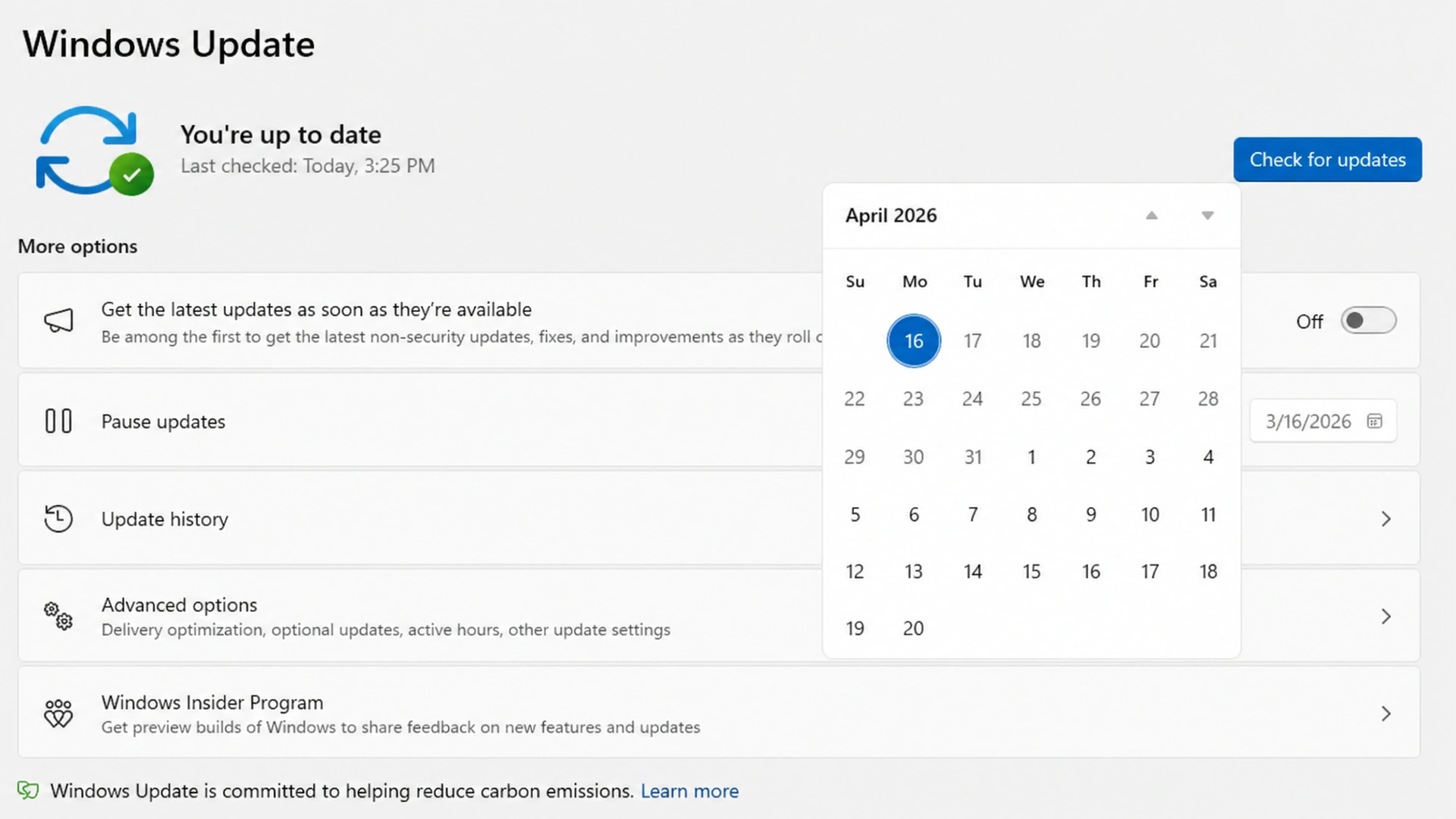
Microsoft is testing one of the most user friendly changes to Windows Update in recent years, giving users the ability to keep pausing updates repeatedly instead of being forced into a fixed deadline. The move is aimed at reducing frustration around automatic restarts, inconvenient update timing, and interruptions during work.
The feature is currently rolling out to users in the Dev and Experimental channels of the Windows Insider Program. If testing goes smoothly, it could later arrive for a wider group of Windows users.
For many people, Windows updates are essential for security and performance, but they have also been a common source of annoyance when they appear at the wrong time. Microsoft now appears to be shifting toward a more flexible and user controlled approach.
Users can now keep extending update pauses
Under the new system, Windows users can pause updates for up to 35 days at a time. The major change is that this 35 day pause can be extended again and again, with no fixed limit on how many times users can reset the countdown.
Microsoft said users can extend the pause end date whenever needed. That means if someone is busy with work projects, gaming sessions, travel, or simply does not want an update installed yet, they can continue delaying it.
Previously, update pause options existed, but they were more restrictive and often forced updates after the maximum limit was reached. This new method gives users more freedom to decide when updates fit into their schedule.
If the pause is not extended after the 35 day window ends, Windows Update will resume normal behavior and begin downloading and installing available updates.
Microsoft responds to years of user complaints
Windows Update has long been criticized for poor timing, surprise restarts, and installations that interrupt important tasks. Many users wanted more control, especially those using their PCs for work, studies, or content creation.
This latest change suggests Microsoft is listening more closely to user feedback. Instead of treating updates as a rigid process, the company is building a system that adapts to how people actually use their devices.
The decision could be especially useful for professionals who rely on stable systems and prefer waiting before installing newer updates. Some users also like to delay updates until early bugs are identified and fixed.
Better labels for driver updates
Microsoft is also improving the clarity of optional driver updates. Users often see driver packages listed without fully understanding what hardware they affect.
Now, driver update titles will more clearly mention the device category involved, such as display, audio, or battery. This can help users make better decisions when reviewing available updates.
For example, a laptop owner troubleshooting sound issues may quickly identify an audio related update, while someone facing battery concerns can more easily spot relevant options.
The change may seem small, but clearer labeling can save time and reduce confusion for everyday users.
Shutdown and restart options stay available
Another useful improvement is in the Windows 11 power menu. Microsoft says users will continue seeing options to restart or shut down the PC without being forced to install updates first.
This addresses a familiar frustration where users simply want to turn off their computer quickly, only to be met with update prompts.
By keeping standard power options available, Microsoft is making it easier for users to choose what happens next instead of being pushed into an update cycle at inconvenient moments.
Fewer restarts through unified updates
Microsoft is also working to streamline how updates are delivered. Instead of separate installations that may trigger multiple restart requests, the company says it is unifying the update experience.
In practice, this means updates can download quietly in the background and wait for a more coordinated installation process. The goal is fewer reboots and less disruption.
For users, that could translate into a smoother maintenance experience with less downtime and fewer interruptions during busy days.
More control during new PC setup
The company is also extending update control during the setup of new Windows devices. This could be valuable for users unboxing a new laptop or desktop who want to begin using the machine immediately rather than wait through long update processes.
Giving users more control at setup helps create a better first impression and reduces one of the common frustrations of starting a new PC for the first time.
Why this matters for Windows users
This update may look simple on the surface, but it signals a broader shift in Microsoft’s philosophy. For years, Windows updates were often seen as necessary but intrusive. By allowing indefinite pause extensions and reducing forced behavior, Microsoft is putting convenience back into the hands of users.
Security updates will still remain important, and delaying updates forever may not be ideal for every person. However, giving people the choice to install updates on their own timeline is likely to be welcomed by millions.
The balance between safety and flexibility has always been difficult for operating systems. Microsoft now seems to be aiming for both.
When the feature could launch widely
At present, the new Windows Update controls are available only in Insider preview channels, where Microsoft tests features before broader release. There is no confirmed public rollout date yet.
If feedback remains positive and testing proceeds smoothly, these changes could eventually become part of a future Windows 11 update for general users.
The bottom line
Microsoft’s latest Windows Update changes may not grab headlines like new AI tools or major hardware launches, but for everyday PC users they could be among the most appreciated improvements of the year.
More control, fewer interruptions, clearer update information, and flexible scheduling address real frustrations that users have raised for years. If the feature reaches the stable version of Windows 11, many users may finally feel that updates work on their schedule instead of the other way around.
Edit Profile
Help improve @KR

Was this page helpful to you?
Contact Khogendra Rupini
Are you looking for an experienced developer to bring your website to life, tackle technical challenges, fix bugs, or enhance functionality? Look no further.
I specialize in building professional, high-performing, and user-friendly websites designed to meet your unique needs. Whether it's creating custom JavaScript components, solving complex JS problems, or designing responsive layouts that look stunning on both small screens and desktops, I can collaborate with you.
Create something exceptional with us. Contact us today
Open for Collaboration
If you're looking to collaborate, I'm available for a variety of professional services, including -
- Website Design & Development
- Advertisement & Promotion Setup
- Hosting Configuration & Deployment
- Front-end & Back-end Code Implementation
- Code Testing & Optimization
- Cybersecurity Solutions & Threat Prevention
- Website Scanning & Malware Removal
- Hacked Website Recovery
- PHP & MySQL Development
- Python Programming
- Web Content Writing
- Protection Against Hacking Attempts