Google moves to fix confusing Workspace app icons with a softer and more distinct design approach
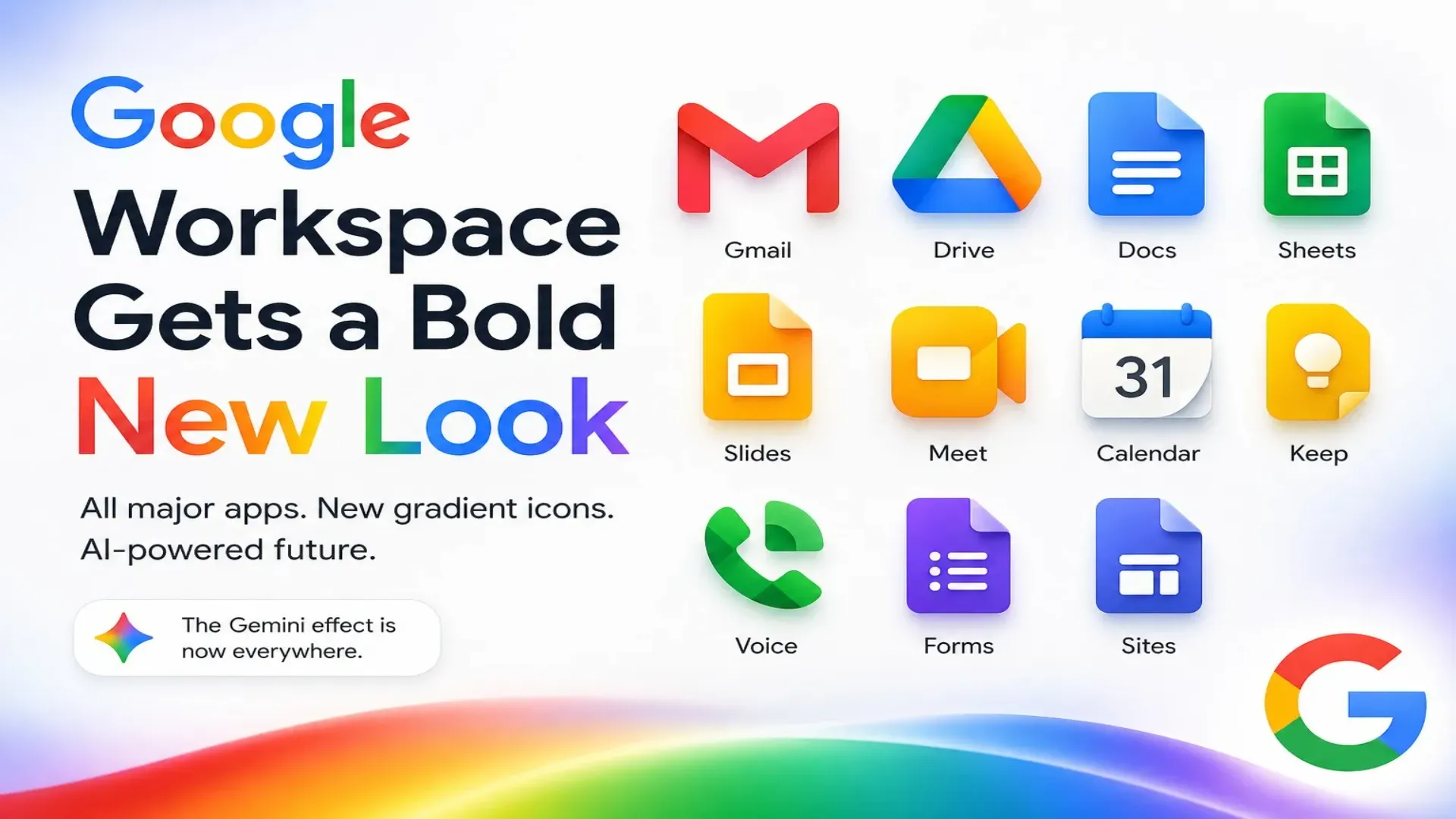
In a quiet but meaningful shift, is preparing to address one of the most persistent criticisms of its modern design language. After years of feedback from users and designers alike, the company is revisiting the visual identity of its core apps, signaling a broader reconsideration of how minimalism has shaped digital interfaces over the past decade.
The change focuses on the icons used across , a platform that includes widely used services such as Gmail, Google Calendar, Google Drive, Google Docs, and Google Meet. The redesign marks a departure from the uniform and often criticized icon system introduced in 2020, which many users found difficult to distinguish at a glance.
A turning point for minimalist design in modern interfaces
The early 2010s saw a decisive shift toward minimalism in digital design. Interfaces became cleaner, flatter, and more restrained, shedding the skeuomorphic elements that once defined operating systems like Windows XP. This transition was widely welcomed at first, offering clarity and simplicity in place of visual clutter.
However, as the trend matured, it began to reveal its limitations. Uniformity, once seen as elegant, started to blur distinctions between apps and functions. In the case of Google, this became particularly evident with the introduction of its four color outline icon system for Workspace apps. While the design reinforced brand identity, it compromised usability.
Icons are meant to serve as quick visual cues. When multiple apps share nearly identical color schemes and shapes, users are forced to pause and inspect them more closely. This undermines efficiency, especially in fast paced digital environments where speed and clarity are essential.
Six years of confusion from similar app identities
When Google transitioned from G Suite to Google Workspace in 2020, it introduced a unified icon design across its ecosystem. The intention was clear: create a cohesive visual language that tied all services together under a single brand identity.
In practice, however, this approach led to widespread confusion. Apps like Gmail, Calendar, Drive, and Meet began to look strikingly similar. The reliance on the same four color palette and outline style made it difficult for users to differentiate between them without focusing on small details.
This issue extended beyond Workspace. Other Google apps such as Maps, Podcasts, Home, and Google One adopted similar design principles, further amplifying the problem across the ecosystem.
For many users, the redesign represented the peak of what critics describe as excessive minimalism. While simplicity is valuable, it should not come at the cost of usability. Over time, the frustration grew, with users calling for clearer, more distinctive visual identities.
A redesigned icon system that prioritizes clarity
According to recent reports, Google is now rolling out a refreshed icon design that moves away from rigid minimalism toward a more expressive and user friendly approach.
The new icons introduce gradients, softer color transitions, and rounded shapes. These elements help create depth and visual distinction, making it easier for users to identify apps quickly. The updated design also aligns with Google's evolving Material 3 Expressive design language, which emphasizes motion, fluidity, and a more human centered aesthetic.
Several apps are undergoing notable changes:
- Gmail retains its recognizable structure but integrates more refined gradient elements.
- Calendar, Meet, and Chat are shifting from multi color outlines to more unified color identities with subtle gradients.
- Drive simplifies its palette, reducing visual complexity.
- Docs, Sheets, Slides, Tasks, and Keep are being updated with rounded forms and softer visual tones.
These adjustments may seem subtle, but they represent a significant improvement in usability. By reintroducing variation and depth, Google is restoring the ability to distinguish apps at a glance, a fundamental principle of good interface design.
A softer and more approachable visual language
Beyond functionality, the redesign also reflects a broader shift in how digital interfaces are meant to feel. The earlier generation of Material You design was often criticized for its sharp edges and stark contrasts. While visually clean, it sometimes felt cold and mechanical.
The new icon set moves in a different direction. Gradients and rounded shapes create a sense of warmth and approachability. This aligns with the animations and transitions introduced in Material 3 Expressive, which aim to make interactions feel more natural and engaging.
For example, the updated Keep icon incorporates a more pronounced lightbulb effect, making it both visually appealing and symbolically clearer. Similarly, the Meet icon has been refined to improve recognition and reduce visual noise.
Not all changes have been universally praised. Some observers note that Gmail’s current “M” outline still lacks the intuitive clarity of the classic envelope symbol used before 2020. Nevertheless, the overall direction is widely seen as a step forward.
The limits of AI generated design in user interfaces
Interestingly, this redesign comes at a time when Google has also been experimenting with AI generated app icons, particularly on its Pixel devices. These tools allow users to create custom themed icons, aiming to unify the appearance of apps across the system.
While innovative, this approach has revealed its own challenges. AI generated icons often lack consistency and can clash with existing UI elements such as widgets and app drawers. More importantly, they can make it even harder to identify apps quickly.
This highlights a key limitation of automated design. Good user interface design is not just about aesthetics; it requires careful consideration of human perception, behavior, and usability. These are areas where thoughtful, human led design still holds a clear advantage.
The lesson here is straightforward. Technology can assist in creativity, but it cannot replace the foundational principles that make interfaces intuitive and effective.
Why this change matters for everyday users
For millions of users worldwide, Google Workspace apps are essential tools for communication, productivity, and collaboration. Small design decisions can have a significant impact on how efficiently these tools are used.
By making icons more distinct and visually intuitive, Google is addressing a real world usability issue. This change reduces cognitive load, allowing users to navigate their devices more quickly and with greater confidence.
It also reflects a broader industry trend. As digital ecosystems become more complex, there is growing recognition that clarity and usability must take precedence over strict design philosophies. Minimalism, while valuable, must be balanced with functionality.
A cautious but important step forward
Google’s updated icon design is not a complete overhaul, nor does it fully abandon the principles that have defined its visual identity in recent years. Instead, it represents a careful recalibration.
The company appears to be acknowledging that its earlier approach may have gone too far in prioritizing uniformity over usability. By reintroducing gradients, depth, and variation, it is taking steps to correct that course.
There is still room for improvement. Some icons could benefit from stronger symbolic elements, and further refinements may be needed to achieve optimal clarity. However, the direction is clear and largely positive.
The future of design beyond minimalism
This shift may signal a broader evolution in digital design philosophy. The era of extreme minimalism is giving way to a more balanced approach, one that values both simplicity and expressiveness.
Users no longer want interfaces that are merely clean; they want them to be intuitive, engaging, and easy to navigate. This requires a blend of visual clarity, thoughtful design, and subtle detail.
Google’s latest changes suggest that even the largest technology companies are beginning to embrace this balance. It is a reminder that design is not static but evolves alongside user needs and expectations.
Conclusion
Google’s decision to revamp its Workspace icons marks an important moment in the ongoing evolution of digital design. By addressing the shortcomings of its previous approach, the company is demonstrating a renewed focus on usability and user experience.
While the changes may appear incremental, their impact is likely to be significant. Clearer, more distinctive icons can improve everyday interactions, making digital tools more efficient and enjoyable to use.
In an industry often driven by trends and experimentation, this move stands out for its practicality. It is not about chasing the next big idea but about refining what already exists to better serve users.
And in the end, that is what good design has always been about.
Frequently Asked Questions
What design issue is Google trying to fix with its Workspace app icons?
Google is addressing user confusion caused by its previous icon design, where multiple apps shared similar colors and shapes, making them difficult to distinguish at a glance.
When did Google introduce the confusing icon design for Workspace apps?
The design was introduced in 2020 during the transition from G Suite to Google Workspace, bringing a uniform four color outline style across major apps.
Which Google apps are affected by the new icon redesign?
The redesign applies to core Workspace apps such as Gmail, Calendar, Drive, Docs, Meet, Chat, Sheets, Slides, Tasks, and Keep, along with updates aligning with other apps like Maps and Photos.
What changes are included in Google's new icon design?
The updated icons feature gradients, softer color transitions, rounded shapes, and more distinct visual identities to improve recognition and usability.
Why was the previous minimalist design criticized?
The minimalist approach reduced visual distinction between apps, forcing users to look closely to identify them, which negatively impacted usability and efficiency.
How does the new design improve user experience?
By making icons more visually distinct and easier to recognize, the new design reduces cognitive effort and helps users navigate their devices more quickly.
What is Material 3 Expressive and how is it related to this update?
Material 3 Expressive is Google's updated design language that emphasizes fluidity, motion, and softer visuals, influencing the new icon style with gradients and rounded forms.
Are all redesigned icons receiving major changes?
No, some apps like Docs, Sheets, Slides, Tasks, and Keep are receiving subtle updates such as rounded edges and gradient effects, while others like Meet and Calendar see more noticeable redesigns.
What criticism still exists with the updated icons?
Some users feel that certain icons, like Gmail's 'M' outline, still lack the clarity and intuitive symbolism of earlier designs such as the classic envelope icon.
How does Google's AI generated icon feature compare to this redesign?
AI generated icons aim to create visual consistency but often make app recognition harder and can clash with the overall interface, highlighting the limitations of automated design.
Why is distinct app icon design important in modern smartphones?
Clear and recognizable icons help users quickly identify apps without hesitation, improving efficiency and reducing confusion in daily digital interactions.
What broader trend does this redesign reflect in the tech industry?
It reflects a shift away from extreme minimalism toward a more balanced design approach that combines simplicity with clarity, depth, and visual expression.
Edit Profile
Help improve @KR
Was this page helpful to you?
Contact Khogendra Rupini
Are you looking for an experienced developer to bring your website to life, tackle technical challenges, fix bugs, or enhance functionality? Look no further.
I specialize in building professional, high-performing, and user-friendly websites designed to meet your unique needs. Whether it's creating custom JavaScript components, solving complex JS problems, or designing responsive layouts that look stunning on both small screens and desktops, I can collaborate with you.
Create something exceptional with us. Contact us today
Open for Collaboration
If you're looking to collaborate, I'm available for a variety of professional services, including -
- Website Design & Development
- Advertisement & Promotion Setup
- Hosting Configuration & Deployment
- Front-end & Back-end Code Implementation
- Code Testing & Optimization
- Cybersecurity Solutions & Threat Prevention
- Website Scanning & Malware Removal
- Hacked Website Recovery
- PHP & MySQL Development
- Python Programming
- Web Content Writing
- Protection Against Hacking Attempts