What is Google Plus Button in Search and Why It Matters
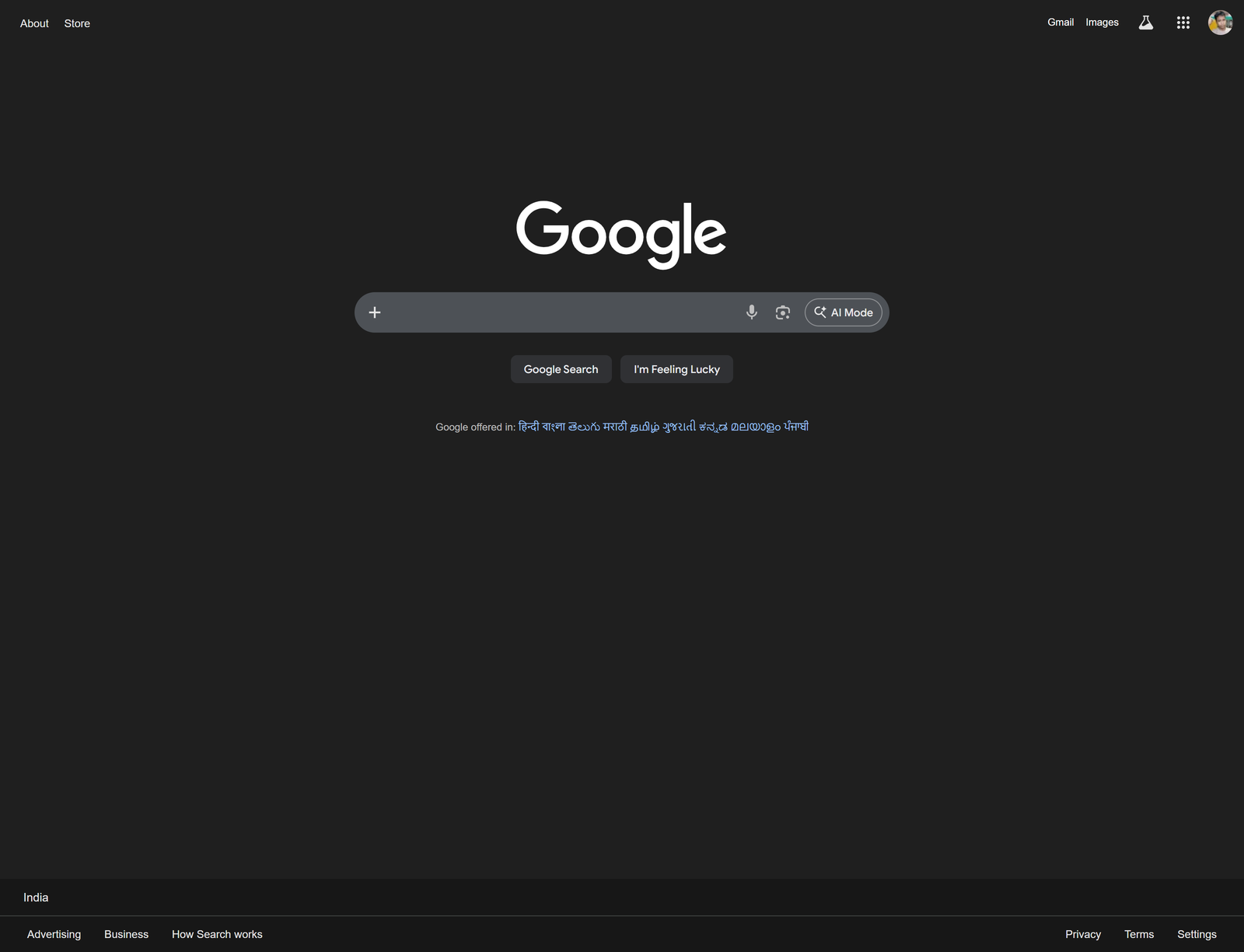
Google has quietly begun reshaping how people start a search. A small plus symbol now appears inside the Google Search bar on desktop, but its impact is far greater than its size. This new button acts as a direct gateway to Google’s AI powered Search experience , making it easier for users to upload files or images and receive intelligent explanations instead of traditional blue links.
A Simple Button With a Bigger Purpose
For decades, Google Search followed a familiar routine. You typed keywords, pressed enter, and scanned a list of web pages. That core experience still exists, but Google is clearly nudging users toward a more conversational and analytical way of searching.
The new plus button replaces the old emphasis on classic search actions and introduces a different starting point. When clicked, it opens a small menu with two options: upload an image or upload a file. Once a user selects either option, Google automatically switches the session into AI Mode .
This means the search no longer begins with links. It begins with understanding.
How the Plus Button Changes Search
Uploading a document or image through the plus button sends the content directly to Google’s AI system. The AI then analyzes the uploaded material and responds with summaries, explanations, or answers based entirely on that content.
For example, a user can upload a PDF and ask for a breakdown of its key points. An image can be uploaded and questioned for details or context. Instead of manually searching for related keywords, users can now interact directly with the content itself.
This functionality already existed inside AI Mode, but it was previously hidden behind extra steps. The plus button brings it to the forefront, making AI driven analysis feel like a natural part of Search rather than a separate feature.
Why Google Is Doing This Now
Over the past year, Google has been steadily transforming Search from a list of results into a conversation. Features like AI Overviews and a dedicated AI Mode reflect this broader shift. The plus button fits neatly into that strategy by reducing friction and making AI the starting point.
Rather than asking users to decide when to use AI, Google places AI at the very beginning of the search journey. Uploading a file instantly opens a dialogue with Google’s multimodal AI, which can read text, interpret images, and respond in natural language.
This approach also helps Google compete more directly with AI tools that focus on document and image analysis.
Desktop First Rollout
At the moment, the plus button is appearing primarily for desktop web users. It is visible even in Incognito mode and is rolling out in regions where AI Mode is available, starting with English language users in the United States.
Mobile browsers do not yet show this feature. That appears intentional. Desktop users are more likely to upload PDFs, documents, and screenshots, making it a practical testing ground before expanding to mobile devices.
Google has indicated that broader availability will follow as AI Mode continues to expand.
A Shift Without Losing Simplicity
Despite the change, Google has been careful not to overwhelm the interface. The Search homepage still looks familiar at first glance. The plus symbol does not openly advertise artificial intelligence, but once used, it clearly signals that Search is no longer limited to keywords.
This balance between tradition and innovation is deliberate. Google wants to preserve the simplicity that made Search successful while quietly guiding users toward smarter, faster answers powered by AI.
What This Means for the Future of Search
The introduction of the plus button is not just a design tweak. It represents a deeper change in how Google expects people to interact with information. Search is becoming less about finding pages and more about understanding content directly.
As this feature expands to more regions and eventually to mobile, uploading images and documents could become as common as typing a question. In that sense, the plus button may be small, but it marks a meaningful step toward an AI first future for Google Search.
Edit Profile
Help improve @KR
Was this page helpful to you?
Contact Khogendra Rupini
Are you looking for an experienced developer to bring your website to life, tackle technical challenges, fix bugs, or enhance functionality? Look no further.
I specialize in building professional, high-performing, and user-friendly websites designed to meet your unique needs. Whether it’s creating custom JavaScript components, solving complex JS problems, or designing responsive layouts that look stunning on both small screens and desktops, I can collaborate with you.
Create something exceptional with us. Contact us today
Open for Collaboration
If you're looking to collaborate, I’m available for a variety of professional services, including -
- Website Design & Development
- Advertisement & Promotion Setup
- Hosting Configuration & Deployment
- Front-end & Back-end Code Implementation
- Code Testing & Optimization
- Cybersecurity Solutions & Threat Prevention
- Website Scanning & Malware Removal
- Hacked Website Recovery
- PHP & MySQL Development
- Python Programming
- Web Content Writing
- Protection Against Hacking Attempts